If you have seen a presentation on assistive technologies and how those technologies change the lives of those that they are meant to enable, then I am sure you will undertand just how emotionally moving the examples that are presented can be.
This blog has been prompted by the video Assistive Technology: Enabling Dreams produced by edutopia and available for viewing at their website or on YouTube. (edutopia, 2010)
I can think of no better example, of just how important an
assistive technology can be, than that of Stephen Hawking. Stephen Hawking is a theoretical physicist,
cosmologist, and Director of Research at the Center for Theoretical Cosmology
at the University of Cambridge. He suffers from a rare form of ALS, a motor neuron
disease that has gradually paralyzed him over decades. Now, he communicates using
only one cheek muscle to activate a speech-generating device; his assistive
technology. (Wikipedia, 2015) (Hawking,
2015)

At this point you may be asking yourself, what do these extreme
examples of assistive technology have to do with the everyday classroom? The answer is that in our technologically
enabled world, we are surrounded by assistive technologies. I will provide some examples and how they
might be used as leverage in the classroom.
I am and have been a terrible speller for all of my
life. When I was young, my mother gave
me a spelling dictionary; no meanings, just words. I guarded that small book as a prized possession. It was with me whenever I wrote. That spelling dictionary, a standard
dictionary, and a thesaurus were my spelling crutches.
Embedded Spell
Checking
Times have changed with the advent of electronic
dictionaries, embedded spelling checkers, active word completion, and speech to
text. How much do we rely on the
embedded spelling checker that exists in nearly all word processing
applications today? When we text on our
phones, the embedded word completions algorithms accelerate the text entry
process, and sometime drive us crazy by trying to force us to use words that we
would have never dreamt of using.
Word pronunciation: Electronic
Dictionaries
How about those electronic dictionaries? Many electronic dictionaries available on smart
phones, tablets, or embedded in websites included audible content that provides
an example pronunciation of the word.

Negotiating meaning: Electronic
Language Translation
Access to an electronic translator can be a lifeline for an
ESL student. When negotiation for meaning
has utterly failed, frustration can be avoided when a translator is added to
the negotiation process. There are
electronic translators that not only translate the text, but also provide
audible output with text to speech. And
example that I have blogged about before is:
zeta imTranslator

Vocabulary
building: In Text Dictionaries
For years whenever I read I had a dictionary with me to
lookup words that I didn’t know the meaning of or words that I didn’t know how
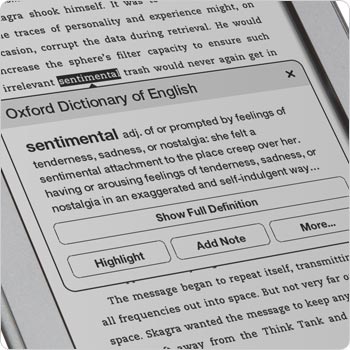
to pronounce. Today we have e-readers that
have embedded dictionaries. I have a
Kindle and the feature that I appreciate the most is the embedded
dictionary. It is so very convenient that
I find that I look up words more often on the Kindle than I did with a
conventional paper dictionary.
Read to me:
Text-To-Speech
I am a firm believer that children learn to read more
quickly and are likely to attain a higher level of reading competency when they
have the experience of being read to on a regular basis. The engagement of both the visual and aural senses
promotes the reading acquisition process.
While I would never argue that text-to-speech could ever equal or
substitute for one person reading to another, I will suggest that text-to-speech
can help a child or an adult for that matter enjoy written text and improve
reading skills.
Read while listening:
Closed-Caption
Like text-to-speech, Closed-Caption provides a simultaneous
link between the aural and visual senses.
It can improve reading ability, concentration skills, listening skills,
and pronunciation. L1 learners as well
as L2 learners can benefit from having the closed caption turned on while
viewing video media.

Let’s chat: Video
Chat / Video Conference
Traditionally learning occurred face-to face, the advent of
video teleconferencing and video chat has changed that means of delivery. With video chat we can project a virtual
classroom to nearly anywhere in the world.
People in the most remote places can now gain access to academic resources.
The spoken word: PodCasts
Podcasts allow us to share the spoken word with the
world. You can listen to a podcast in
almost any environment; while running, while driving, while swimming. In, How technology allowed me to read, Ron
McCallum, an Australian legal academic, Dean of Law at the University of Sydney
describes how he has met the challenge of being blind since birth and yet
acquiring the knowledge that he has from written text. In his TED Talk, Ron McCallum guides us
through a history of enabling assistive technologies for the blind that have
evolved to text-to-speech devices today.
Among the technologies that he describes is; transcribed audio tapes
(reel-to-reel), audio books on tape, audio books on CD, and Podcasts. (McCallum, 2013)
Chris Bugaj and his wife Melissa co-author the blog www.nightlightstories.net; on the
site they post podcast of children’s stories that they have written and then
read aloud.

Chris also authors the website Assistive Technology: Tools In Public Schools Cast http://attipscast.com/

TED: Ideas worth
spreading
I am addicted to TED. I
am including below links to TED Talks that I have found that address assistive
technology.
Bibliography
Bugaj, C. (2014, 03 02). TEDxAshburn: Chris
Bugaj: Disability-led innovations for the masses. Retrieved from YouTube:
https://www.youtube.com/watch?v=D-hPct3oIow
edutopia. (2010, July 28). Assistive Technology:
Enabling Dreams. Retrieved from edutopia:
https://www.youtube.com/watch?v=rXxdxck8Gic
Evans, H., & Jenkins, C. (2013, 11 20). TED:
Henry Evans and Chad Jenkins: Meet the robots for humanity . Retrieved
from YouTube: https://www.youtube.com/watch?v=aCIukWXmlV4
Hawking, S. (2015, 02 15). Stephen Hawking.
Retrieved from Stephen Hawking: http://www.hawking.org.uk/
Marsden, R. (2012, 07 31). TEDxEdmonton: Randy
Marsden: Engineering for social impact. Retrieved from YouTube:
https://www.youtube.com/watch?v=UCDwNWSXFHk
McCallum, R. (2013, 09 11). YouTube: Ron
McCallum: How technology allowed me to read. Retrieved from YouTube: TED:
https://www.youtube.com/watch?v=QoTSdOkjEVs
Nguyen, J. (2014, 11 05). TEDx The Rocks: Jordan
Nguyen: Enabling technology. Retrieved from YouTube: https://www.youtube.com/watch?v=Y7jn9y9gDsk
Patel, R. (2014, 02 13). TED: Rupal Patel:
Synthetic voices, as unique as fingerprints. Retrieved from YouTube:
https://www.youtube.com/watch?v=d38LKbYfWrs
Wikipedia. (2015, 02 12). Wikipedia: Stephen
Hawking. Retrieved from Wikipedia: The Free Encyclopedia:
http://en.wikipedia.org/wiki/Stephen_Hawking
Young, S. (2014, 06 09). TED: Stella Young: I'm
not your inspiration, thank you very much. Retrieved from YouTube:
https://www.youtube.com/watch?v=8K9Gg164Bsw
